First of all lets bootstrap a new application using Quarkus – Start coding with code.quarkus.io. I chose Maven as build tool and added the below extensions.
- RESTEasy Jackson – to help us create restful APIs
- MongoDB with Panache – to help us persist the data in MongoDB
RESTEasy Jackson – Provides dependencies that helps us to create Restful APIs , serialize/de-serialize JSON to Java and vice-versa, etc. Consider it equivalent to spring-boot-starter-web dependency in a Spring Boot application.
MongoDB with Panache – Has all dependencies that helps us to connect to MongoDB and perform database read/write. Consider it equivalent to spring-boot-starter-data-mongo dependency in a Spring Boot application.
After generating the application, I have added a couple of additional dependencies in my pom.xml to help myself write better test cases and assertions.
- RestAssured – to write clean tests in BDD pattern
- AssertJ – for better readable assertions.
- JSONAssert – for assertion of JSON content
In Spring Boot, AssertJ and JSONAssert dependencies comes by default under the spring-boot-starter-test umbrella. Here we have to add them explicitly.
Lets start with the first test case
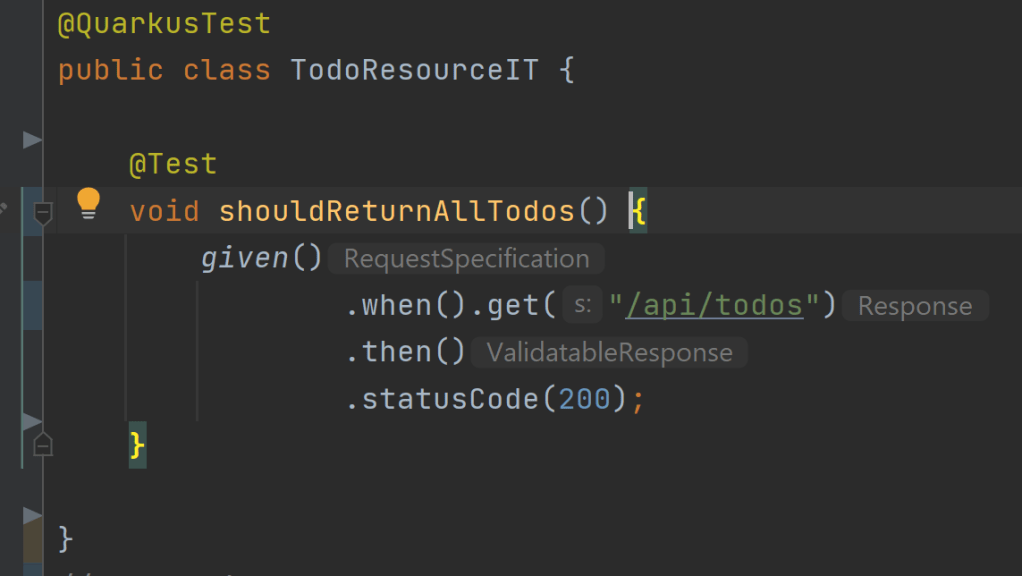
See the beauty of using RestAssured API. The test case is more readable, understandable and follows a BDD pattern. Coming back to the test case, the tests should fail at this point because we don’t have any implementation yet. Lets quickly jump on to the implementation.
Here comes the model class
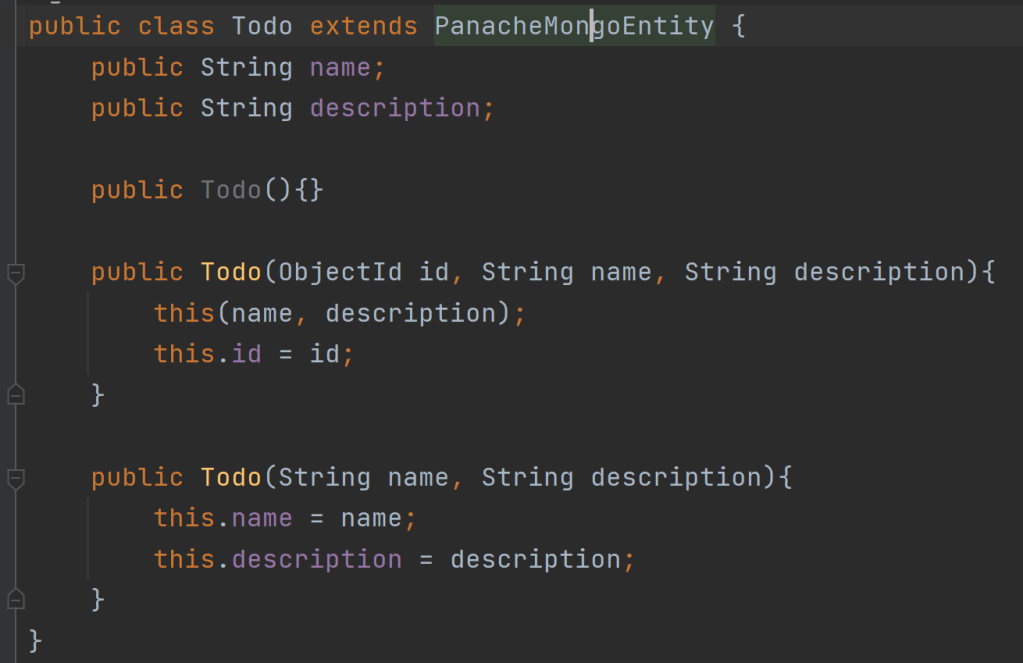
In Spring boot application, we used Java record to create the Todo model class. But here our model has to extend PanacheMongoEntity (which provides an id property by default and other utility methods which might be needed going forward). Since Java record does not allow us to extend another class, we cannot use Java record any more for Todo model class.
Another thing to be noted here is that I have made the properties public instead of private with getter and setters. As per Quarkus documentation, it is allowed to make the properties public as well as private with getter and setter accessor methods.

In case of Spring Boot, we created a repository interface that extends MongoRepository. For Quarkus, we have to create a class that implements PanacheMongoRepository. And we have to add an additional annotation @ApplicationScoped to mark it as a bean with application scope. You can find more information about quarkus application context, scope and dependency injection in here.
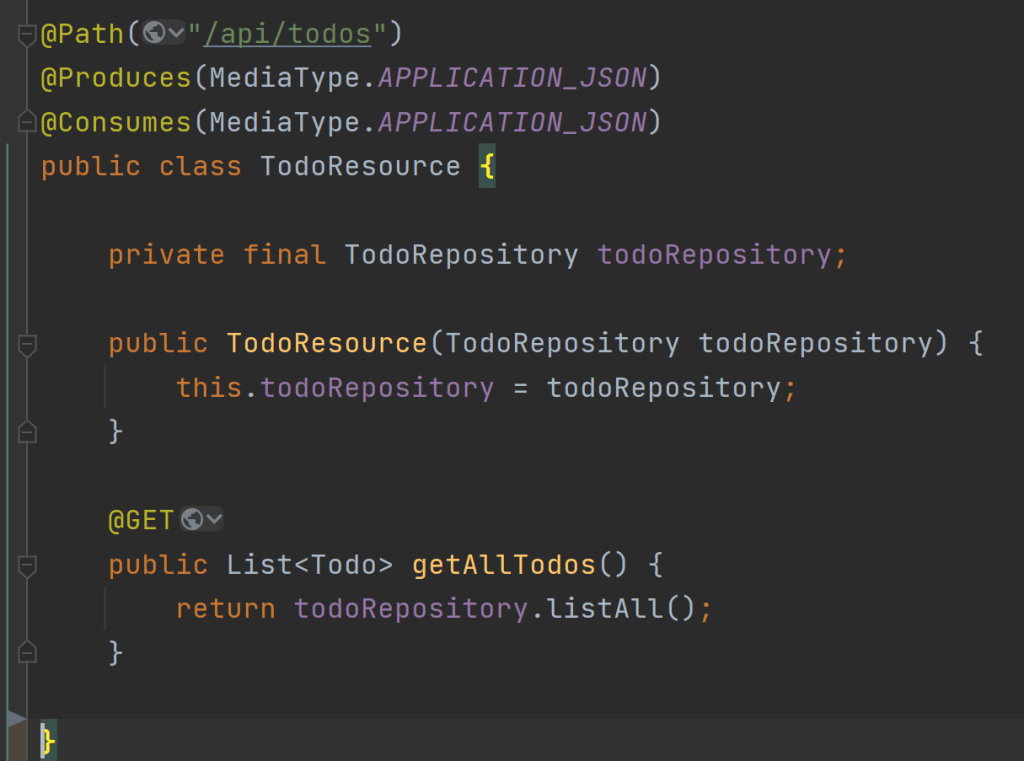
In the resource, we are using JAXRS annotations to build our Restful APIs. In Spring Boot, we were using spring web API to create our resources instead. Note that it is also possible to use spring-web API in Quarkus to create the Restful resources. Quarkus provides a spring-web extension for the same.
Mongodb database configuration Make sure that the connection-string is prefixed with proper environment (like %prod) if you are pointing to an actual database, if not, its possible that the test cases might alter your actual database.
#application.properties
%prod.quarkus.mongodb.connection-string = mongodb://localhost:27017
quarkus.mongodb.database = todos
But we didn’t had to do such a configuration in our spring boot application. Why? Because spring boot always comes with a set of auto configuration classes and default values. Which makes it optional to configure those properties. Hope that makes sense.
All set! Now if you run the tests, everything should be working fine.
Quarkus dev services – Quarkus offers dev services which boots up mongodb test container in dev and test mode.
It’s time to enrich our test class with additional test cases for other CRUD operations.
@QuarkusTest
public class TodoResourceIT {

    @Inject
    TodoRepository todoRepository;

    @AfterEach
    void deleteAll() {
        todoRepository.deleteAll();
    }

    @Test
    void shouldReturnAllTodos() throws JSONException {
        todoRepository.persist(new Todo("Find", "Find the letter F"));
        String response = given()
                .when().get("/api/todos")
                .then()
                .statusCode(200)
                .extract().response().asString();
        JSONAssert.assertEquals("[{\n" +
                "                    \"name\" : \"Find\",\n" +
                "                    \"description\" : \"Find the letter F\"\n" +
                "                }]", response, JSONCompareMode.LENIENT);
    }

    @Test
    void shouldReturnTodoById() throws JSONException {
        Todo todo = new Todo("Find", "Find the letter F");
        todoRepository.persist(todo);
        String response = given()
                .when().get("/api/todos/{id}", Map.of("id", todo.id.toString()))
                .then()
                .statusCode(200)
                .extract().response().asString();
        JSONAssert.assertEquals("{\n" +
                "                    \"name\" : \"Find\",\n" +
                "                    \"description\" : \"Find the letter F\"\n" +
                "                }", response, JSONCompareMode.LENIENT);
    }

    @Test
    void shouldSaveTodo() throws JSONException {
        Todo todo = given()
                .header(HttpHeaders.CONTENT_TYPE, MediaType.APPLICATION_JSON)
                .body(new Todo("Find", "Find the letter F"))
                .when().post("/api/todos")
                .then()
                .statusCode(200)
                .extract()
                .as(Todo.class);
        assertThat(todo.id).isNotNull();
        assertThat(todo.name).isEqualTo("Find");
        assertThat(todo.description).isEqualTo("Find the letter F");
    }

    @Test
    void shouldUpdateTodo() throws JSONException {
        Todo todo = new Todo("Find", "Find the letter F");
        todoRepository.persist(todo);
        //update
        given()
                .header(HttpHeaders.CONTENT_TYPE, MediaType.APPLICATION_JSON)
                .body("{\n" +
                        "                            \"name\" : \"Replace\",\n" +
                        "                            \"description\" : \"Replace by K\"\n" +
                        "                        }")
                .when().put("/api/todos/{id}", Map.of("id", todo.id.toString()))
                .then()
                .statusCode(200);
        //get
        String response = given()
                .when().get("/api/todos/{id}", Map.of("id", todo.id.toString()))
                .then()
                .statusCode(200)
                .extract().response().asString();
        JSONAssert.assertEquals("{\n" +
                "                    \"name\" : \"Replace\",\n" +
                "                    \"description\" : \"Replace by K\"\n" +
                "                }", response, JSONCompareMode.LENIENT);
    }

    @Test
    void shouldDeleteTodo() throws JSONException {
        Todo todo = new Todo("Find", "Find the letter F");
        todoRepository.persist(todo);
        //delete
        given()
                .header(HttpHeaders.CONTENT_TYPE, MediaType.APPLICATION_JSON)
                .when().delete("/api/todos/{id}", Map.of("id", todo.id.toString()))
                .then()
                .statusCode(204);
        //get
        given()
                .when().get("/api/todos/{id}", Map.of("id", todo.id.toString()))
                .then()
                .statusCode(404);
    }
}
Here you can see that I have injected TodoRepository in my test class so that I can delete all persisted data after each test run as well as perform other database operations when needed.
You might be wondering on why I didn’t use the multiline string literal instead of double quotes. Because the java version that we are using in this project is 11.
Again back to the resource to add all other CRUD operations.
@Path("/api/todos")
@Produces(MediaType.APPLICATION_JSON)
@Consumes(MediaType.APPLICATION_JSON)
public class TodoResource {

    private final TodoRepository todoRepository;

    public TodoResource(TodoRepository todoRepository) {
        this.todoRepository = todoRepository;
    }

    @GET
    public List<Todo> getAllTodos() {
        return todoRepository.listAll();
    }

    @GET
    @Path("/{id}")
    public Todo getTodo(@PathParam("id") String id) {
        return Optional.ofNullable(todoRepository.findById(new ObjectId(id))).orElseThrow(NotFoundException::new);
    }

    @POST
    public Todo saveTodo(Todo todo) {
        todoRepository.persist(todo);
        return todo;
    }

    @PUT
    @Path("/{id}")
    public Todo updateTodo(@PathParam("id") String id, Todo todo) {
        Todo newTodo = new Todo(new ObjectId(id), todo.name, todo.description);
        todoRepository.update(newTodo);
        return newTodo;
    }
    @DELETE
    @Path("/{id}")
    public void deleteTodo(@PathParam("id") String id) {
        todoRepository.deleteById(new ObjectId(id));
    }
}
Run the tests. All OK! Our Todo application using quarkus is now ready. For the complete code checkout my github.
One of the first and most important feature of Quarkus is that it’s Kubernetes-native. Quarkus was built around a container-first philosophy, meaning it’s optimized for lower memory usage and faster startup time. So the evaluation on Quarkus is never complete without having a native cloud deployment.
Stay tuned to learn more about the native deployment of Quarkus application.
I hope you enjoyed the read, please reach out to me if you have any suggestions or comments.

 Thoughts, Learnings and Realizations
I have made a little edit in the post from 16 June 2021. The flapdoodle dependency for embedded containers will not work out of the box for quarkus. It works well in spring boot because spring boot has an autoconfiguration class that does all the necessary configurations to startup a mongodb server. And since quarkus does not has such an autoconfiguration class (afaik), the flapdoodle embedded mongo will not work out of the box and also I found it a bit overwhelming to make it work for quarkus. So I thought to use test containers for mongodb instead. Configuration of testcontainer was pretty simple and straight forward compared to that of flapdoodle embedded mongo.
You might think how my test cases worked before during my initial post, yes you are right. I didn’t notice that a local mongodb instance was already running in my computer which made me think that Quarkus also had the magical autoconfiguration that started the server before running the tests.
LikeLike