In my previous post, I have shared how to create a simple serverless lambda function using AWS SAM cli. In this post, I will explain on how to create a secure lambda Rest API.
Please note that there are different mechanisms for authentication and authorization of REST Apis. And Lambda authorizer is one such mechanism to control access to an API particularly if you want to implement a custom authorization scheme using OAuth or SAML.
Here is how it works, an extract from AWS documentation.

There are two types of Lambda Authorizers:
- Token based Lambda authorizer (also called TOKEN authorizer)
- Request parameter based Lambda authorizer (also called REQUEST authorizer)
In this example, we will be looking at REQUEST authorizer. Here is the link for the complete source code used in this post.
As a first step, let us initialize a new project using SAM CLI. You may refer my previous post if you are not familiar with SAM. I’ll be using Java11 as runtime for this project.
After initialization, you may run a “sam build” and optionally run the API locally using “sam local start-api” to verify if everything looks good so far.
Add a new Authorizer function
Add a new class, let us name it as Authorizer. The Authorizer function is yet another lambda function that implements RequestHandler interface. But instead of returning an APIGatewayProxyResponseEvent, the authorizer function will be returning a principal and Policy. Note that it is not necessary to make your Authorizer class in the same HelloWorldFunction module. You can also make your Authorizer function as a different module and share it across different functions and APIs.
public class Authorizer implements RequestHandler<APIGatewayProxyRequestEvent, AuthResponse> {

    @Override
    public AuthResponse handleRequest(APIGatewayProxyRequestEvent requestEvent, Context context) {
        APIGatewayProxyRequestEvent.ProxyRequestContext proxyContext = requestEvent.getRequestContext();
        APIGatewayProxyRequestEvent.RequestIdentity identity = proxyContext.getIdentity();
        String arn = String.format("arn:aws:execute-api:us-east-1:%s:%s/%s/%s/%s",
                proxyContext.getAccountId(),
                proxyContext.getApiId(),
                proxyContext.getStage(),
                proxyContext.getHttpMethod(),
                "*");

        String authorization = requestEvent.getHeaders().get("Authorization");
        if (!"Hello@Authorizer".equals(authorization)) {
            return apiGatewayResponse(identity.getAccountId(), "Deny", arn);
        }
        return apiGatewayResponse(identity.getAccountId(), "Allow", arn);
    }

    private AuthResponse apiGatewayResponse(String principalId, String effect, String resource) {
        return new AuthResponse(principalId,
                new PolicyDocument("2012-10-17",
                        new Statement("execute-api:Invoke", effect, resource)));
    }
}
In Authorizer, we are supposed to verify the incoming “Authorization” request header (or any request parameter of your choice) to verify if it is a valid OAuth token or a custom value.
In my example, I will keep my validation really simple (not to deviate from the topic). I’ll validate the request header “authorization” against a string value “Hello@Authorizer”. If the header value is not equal to this string, then deny the all calls towards the REST Api.
Take a note of the policy document that gets returned in both cases. If the authorization succeeds, then we send a policy with effect “Allow“, else “Deny“.
Let us now see how to apply the new Authorizer function to our Rest API. To apply the new Authorizer on my Rest API, I have created two additional resources in my template.yaml file.
One resource is the authorizer function itself (of type AWS::Serverless::Function and name AuthorizerFunction) and the second one is of type AWS::Serverless:Api (with name HelloWorldApi) and acts like a proxy to the original Rest API function (HelloWorldFunction). The serverless Api resource has an Auth property with a default authorizer that points to AuthorizerFunction arn.
Additionally I had to make these two changes
- In HelloWorldFunction (Actual Rest API function) event properties I have added a RestApiId property that refers to the new Api resource.
- In the output, replace the reference for implicit ServerlessRestApi with HelloWorldApi
Here is the content of the complete template.yaml file
AWSTemplateFormatVersion: '2010-09-09'
Transform: AWS::Serverless-2016-10-31
Description: >
  sam-lambda-authorizer

  Sample SAM Template for sam-lambda-authorizer

# More info about Globals: https://github.com/awslabs/serverless-application-model/blob/master/docs/globals.rst
Globals:
  Function:
    Timeout: 20

Resources:
  AuthorizerFunction:
    Type: AWS::Serverless::Function
    Properties:
      CodeUri: HelloWorldFunction
      Handler: helloworld.Authorizer::handleRequest
      Runtime: java11
      Architectures:
        - x86_64
      MemorySize: 512
  HelloWorldApi:
    Type: AWS::Serverless::Api
    Properties:
      StageName: Prod
      Auth:
        DefaultAuthorizer: MyLambdaRequestAuthorizer
        Authorizers:
          MyLambdaRequestAuthorizer:
            FunctionPayloadType: REQUEST
            FunctionArn:
              Fn::GetAtt:
                - AuthorizerFunction
                - Arn
            Identity:
              Headers:
                - Authorization
  HelloWorldFunction:
    Type: AWS::Serverless::Function # More info about Function Resource: https://github.com/awslabs/serverless-application-model/blob/master/versions/2016-10-31.md#awsserverlessfunction
    Properties:
      CodeUri: HelloWorldFunction
      Handler: helloworld.App::handleRequest
      Runtime: java11
      Architectures:
        - x86_64
      MemorySize: 512
      Environment: # More info about Env Vars: https://github.com/awslabs/serverless-application-model/blob/master/versions/2016-10-31.md#environment-object
        Variables:
          PARAM1: VALUE
      Events:
        HelloWorld:
          Type: Api # More info about API Event Source: https://github.com/awslabs/serverless-application-model/blob/master/versions/2016-10-31.md#api
          Properties:
            RestApiId: !Ref HelloWorldApi
            Path: /hello
            Method: get
Outputs:
  # ServerlessRestApi is an implicit API created out of Events key under Serverless::Function
  # Find out more about other implicit resources you can reference within SAM
  # https://github.com/awslabs/serverless-application-model/blob/master/docs/internals/generated_resources.rst#api
  HelloWorldApi:
    Description: "API Gateway endpoint URL for Prod stage for Hello World function"
    Value: !Sub "https://${HelloWorldApi}.execute-api.${AWS::Region}.amazonaws.com/Prod/hello/"
  HelloWorldFunction:
    Description: "Hello World Lambda Function ARN"
    Value: !GetAtt HelloWorldFunction.Arn
  HelloWorldFunctionIamRole:
    Description: "Implicit IAM Role created for Hello World function"
    Value: !GetAtt HelloWorldFunctionRole.Arn
That’s it. Lets deploy it an see if it works.
Important: Unfortunately the AWS SAM CLI doesn’t support authorizers yet when running code locally. However there is an open feature request to add support for it: https://github.com/awslabs/aws-sam-cli/issues/137. So even if you run it locally, the API response will always be success irrespective of the authorization parameter.
Let’s do a build (sam build) and deploy (sam deploy –guided) to AWS. Make sure that you have set up the credentials before deployment. If not, you will get an error like this “botocore.exceptions.NoCredentialsError: Unable to locate credentials”
On successful deployment, you should see a screen like below.
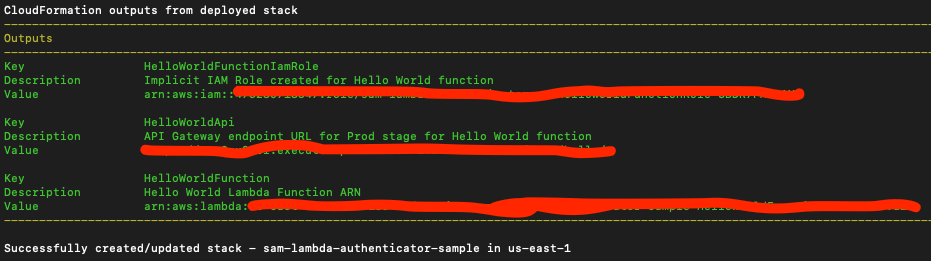
Lets do some testing. You should see that the API is not accessible anymore without authorization header.

And with proper authorization header, it works.

Note that it wasn’t straight forward for me to make my Authorizer work with SAM. Especially since there was no local support from SAM CLI for authenticators, I had to do some debugging, trial and errors to make it work. Here are some tips and tricks I followed to debug my lambda authorizer.
Tips and Tricks for debugging Lamda Authorizer
- CloudWatch – Logs are our best friends for debugging a lambda in AWS. Always keep an eye on cloud watch logs. Note that the log group for each function is different.
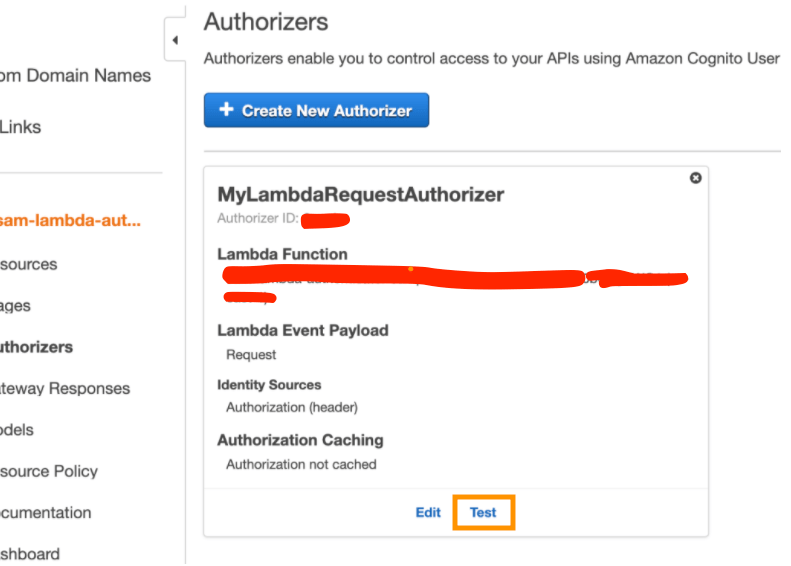
- Test the authorizer from AWS console before doing an E2E testing(refer below screenshot). Testing the API from Resources will not trigger the authenticator, it will always result in success response (I’m not sure if this is an AWS bug)
- Enable API gateway logging, if you want to debug the proxy event objects created by API gateway, enabling API gateway logs seems to be a better option than adding more log statements.
- Disable Authorization caching – This technique is helpful if you keep on changing your policy for same params and values.
- Log request event parameters within lambda – I am not sure if it is good to do but I had instances where in I was expecting a header parameter “Authorization” which came in as “authorization” (all small letters) that broke my case-sensitive logic. Logging the request params within the lambda function helped me there.
I hope this post helps someone who is new to AWS lamda. Here is the link for the complete source code. Feel free to add your comments and queries (if any). I am happy to help.

 Thoughts, Learnings and Realizations