Introduction
The deployment of Java applications has evolved significantly from traditional methods using WAR and EAR files to leveraging modern technologies like Docker and cloud platforms. This post explores this transformation and further delves into the roles of Kubernetes and OpenShift in modernizing deployment infrastructures.
Basics of WAR and EAR Files
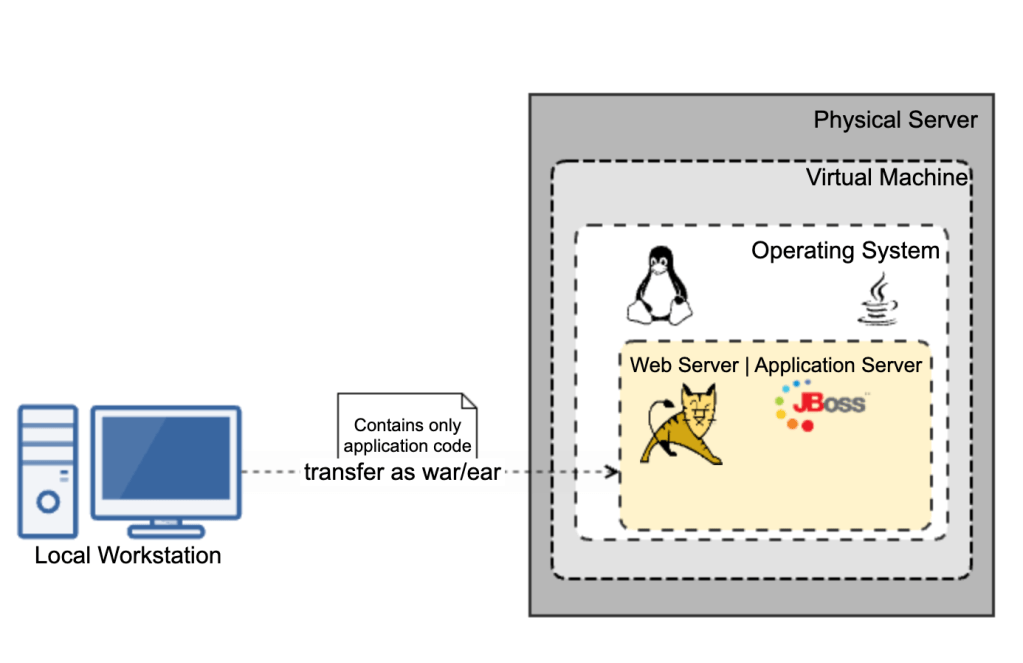
In traditional Java environments, applications were packaged into Web Application Archives (WAR) for web modules and Enterprise Application Archives (EAR) for enterprise applications. These packages were deployed manually on servers like Apache Tomcat or IBM WebSphere, often leading to the “it works on my machine” problem due to environmental discrepancies.
Deployment Process
This traditional approach required extensive manual effort in managing servers, configuring applications, and maintaining security, making the process cumbersome and error-prone.
Transition to Containerization with Docker
Introduction to Docker
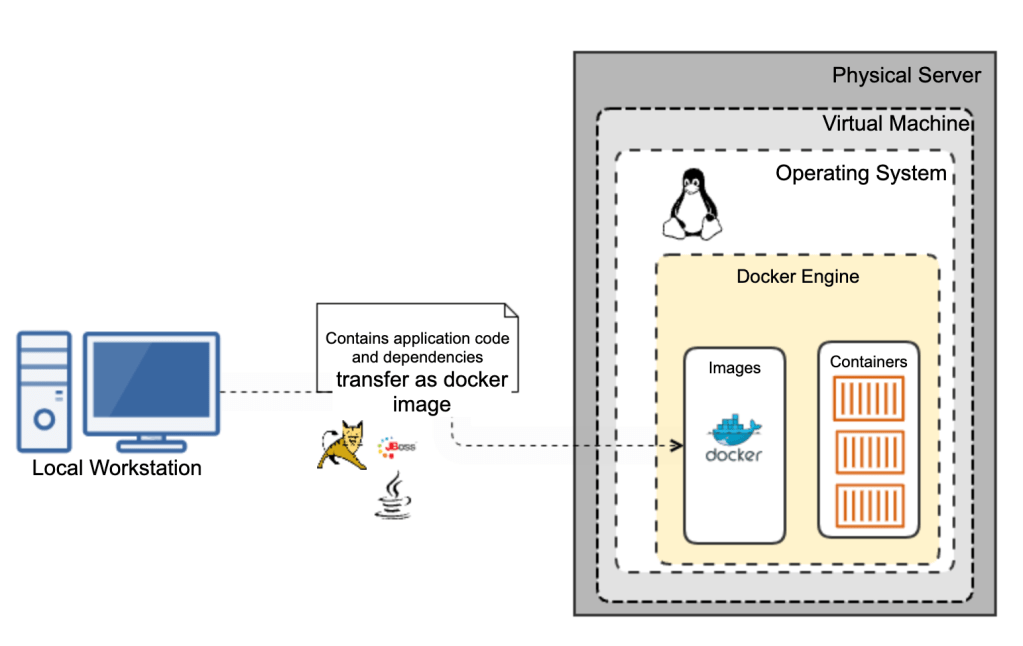
The introduction of Docker revolutionized the deployment of applications by using containers. Containers package the application and its dependencies into a single runnable unit, ensuring consistency across environments, which mitigates compatibility issues and simplifies developer workflows.
Java Applications in Docker
For Java applications, Docker allows developers to define their environment through a Dockerfile, specifying everything from the Java version, web/application server version, fonts, other dependencies. This file creates an image that can be deployed anywhere Docker is installed, reducing the overhead of traditional deployment and increasing deployment speed significantly.
Moving to the Cloud
Cloud Deployment Models
With the advent of cloud computing, deployment strategies have evolved into models like Infrastructure as a Service (IaaS), Platform as a Service (PaaS), and Software as a Service (SaaS). These models offer varying levels of control, flexibility, and management, tailored to different business needs.
Direct Container Deployment
One of the key advantages of containerization with Docker is the ability to take a Docker container or image and directly deploy it to a cloud platform. This approach simplifies the migration process and ensures that the application runs the same way it does in your local environment, regardless of the cloud provider.
Container-Ready Cloud Services: Major cloud providers like AWS, Azure, and Google Cloud offer services specifically designed to host containerized applications. For instance:
- AWS Elastic Container Service (ECS) and AWS Elastic Kubernetes Service (EKS) support Docker and allow you to run containers at scale.
- Azure Container Instances (ACI) and Azure Kubernetes Service (AKS) provide similar functionalities, facilitating easy deployment and management of containers on Azure.
- Google Kubernetes Engine (GKE): Specializes in running Docker containers and offers deep integration with Google Cloud’s services, making it ideal for complex deployments that require orchestration.
- Google Cloud Run: A fully managed platform that lets you run stateless containers, invocable via web requests or Pub/Sub events. It combines the simplicity of serverless computing with the flexibility of containerization, automatically scaling based on traffic, and billing only for the resources used during execution.
Java in the Cloud
Using cloud platforms, Java developers can drastically reduce the overhead associated with infrastructure management. Services like AWS Elastic Beanstalk, Azure App Services, and Google App Engine automate deployment, scaling, and maintenance, allowing developers to concentrate on their core application logic.
Advanced Container Orchestration with Kubernetes and OpenShift
Kubernetes: The Container Orchestrator
Kubernetes is an open-source platform designed to automate the deployment, scaling, and operation of application containers across clusters of hosts. It helps manage containerized applications more efficiently with features like:
- Pods: The smallest deployable units created and managed by Kubernetes.
- Service Discovery and Load Balancing: Kubernetes can expose a container using the DNS name or its own IP address. If traffic to a container is high, Kubernetes is able to load balance and distribute the network traffic.
- Storage Orchestration: Kubernetes allows you to automatically mount a storage system of your choice, whether from local storage, a public cloud provider, or a network storage system.
OpenShift: Enterprise Kubernetes
OpenShift is a Kubernetes distribution from Red Hat, designed for enterprise applications. OpenShift extends Kubernetes with additional features to enhance developer productivity and promote innovation:
- Developer and Operational Centric Tools: OpenShift provides a robust suite of tools for developers and IT operations, enhancing productivity and promoting a DevOps culture.
- Enhanced Security: Offers more secure default settings and integrates with enterprise security standards.
- Build and Deployment Automation: Facilitates continuous integration (CI) and continuous deployment (CD) pipelines directly within the platform.
Best Practices and Future Trends
Best Practices
For successful cloud and container orchestration deployments, integrate CI/CD pipelines, employ effective monitoring and logging, and adopt a microservices architecture.
Future Trends
The future points towards even more automated solutions like serverless computing, with Kubernetes and AI-driven tools driving smarter deployment strategies.
Conclusion
The evolution from traditional WAR and EAR deployments to using Docker, Kubernetes, and OpenShift reflects the dynamic nature of software development, offering more scalable, efficient, and reliable deployment options.

 Thoughts, Learnings and Realizations